


Benzinga Financial News & Data
4.4142.00 Reviews
App Specs
- Version
- 3.5.11
- Updated On
- License
- Free
- Downloads
- 100,000+
- Developer
- Benzinga
- Categories
- Finance
- Platform
- Android
Screenshots

 Analysis by AppCompare
When I use a finance app, I want to know what it helps me see—and what I should not mistake it for. Benzinga Financial News & Data is a news and market-information app from Benzinga, aimed at readers who want to follow companies and financial events without opening several separate sources. I find that useful as a starting point for research, but I would not treat a fast headline or a screening result as a personal recommendation to buy or sell.
News can inform decisions, but it is not a trust shortcut
Financial news often arrives while a story is still developing. That speed can help me notice a company announcement or a change in market attention, yet it also means I need to pause before acting. I try to distinguish the report itself from my interpretation of what it might mean, and then check details that matter to my own decision. An app can make information easier to reach; it cannot remove the need to judge its relevance or accuracy for a particular investment.
That distinction matters especially for newer investors. A stream of market updates can feel authoritative simply because it is immediate and presented in a polished interface. I would use Benzinga to find topics worth investigating, not as a substitute for understanding risk, comparing original company information, or deciding whether a financial product suits my circumstances. If I were looking for tailored financial advice, I would choose an appropriate professional rather than expect a news app to provide it.
What I can verify, and what I would check myself
I keep trust questions practical: what information does an app show before I act, what choices does it present, and what do I understand about the account or device access involved? I don’t assume that a finance label automatically means an app handles money, connects to a brokerage, or has any particular privacy practice. Those are distinct matters, and I would check the current app permissions, privacy information, and any account settings directly on my device before sharing sensitive details.
The same caution applies to notifications and personalization. If I choose to follow financial topics or receive alerts, I would consider whether those choices fit my routine and how much market activity I actually want interrupting my day. A useful setup is not necessarily the one with the most updates. I prefer to begin with a narrow set of interests, then adjust only after I know which alerts help me make better-informed decisions rather than simply pull my attention toward every price move.
Where Benzinga fits in a finance routine
For me, the strongest role for a news app is as one layer in a broader routine: scan, identify a question, verify the important details, and decide whether the issue deserves more time. That is different from placing an order. If I already use a broker’s app, I might keep that for account-specific tasks and use Benzinga for market reading; if I mainly want long-term budgeting or banking tools, a news-focused app is a poor substitute.
I would also avoid letting rapid updates dictate my schedule. A headline can be worth noting without requiring an immediate response, and a calendar entry can help me plan when to pay attention without predicting what will happen. I find that framing keeps the app useful even on days when I do not trade: it can help me understand what is being discussed in the financial world, while my actual decisions remain deliberate.
Worth Reading Before You Choose

EA SPORTS FC Mobile 26 Is a Bigger Football Game, but It Takes Time

Flipboard Shows What News Apps Must Do Beyond the Feed

Switching to Android Auto Means Rethinking Your Driving Routine

Google Calendar Makes a Crowded Week Easier to Manage

Ludo King Makes the Most of the Minutes Between Plans

Baby Panda World Brings Quick Play to Modern Phones, but Its Game Library Feels Busy
Getting Started with Benzinga
First things first, downloading Benzinga Financial News & Data is a breeze. It's available for both Android and iOS, so you’re covered regardless of your device. Once installed, you'll notice the sleek and straightforward interface. No need to fumble around; it's designed to get you straight to the good stuff—financial data and news.
The app kicks off with a quick onboarding process that helps tailor the content to your interests. Whether you're all about stocks, options, or cryptocurrency, Benzinga has got you covered. The customization is pretty cool because it means you're not bombarded with content you have zero interest in.
In practical terms, I would use that setup to make the first screen answer a specific question: what companies or themes do I want to keep an eye on this week? A focused feed is easier to scan than a broad stream when I only have a short break. I would also revisit those interests periodically, especially if a temporary project or watchlist is no longer relevant, so yesterday’s curiosity does not dominate today’s reading.
Features That Stand Out
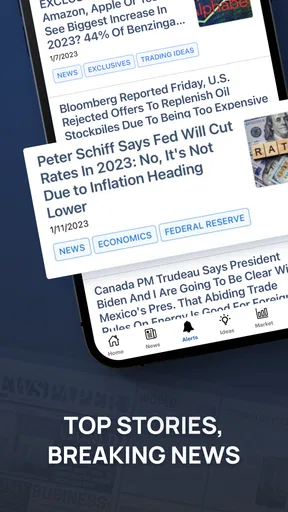
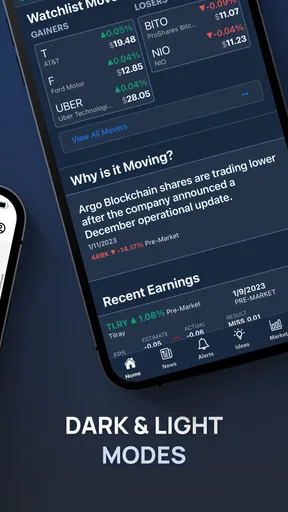
Now, let's talk features. One of my favorites is the real-time news feed. It's like having a financial newsroom in your pocket. The app aggregates news stories and analyses from multiple sources, delivering them as they happen. It’s a lifesaver when you need to stay updated on market movements.
Then there’s the stock screener. For the uninitiated, this is a tool that lets you filter stocks based on specific criteria—price, market cap, dividend yield, you name it. It's intuitive and incredibly handy for those wanting to make informed investment decisions.
I see a screener as a way to narrow a crowded field, not to produce a ready-made shortlist of good investments. One useful habit is to change one filter at a time and notice how the results shift; stacking many conditions immediately can hide companies that deserve a closer look. Once a result catches my attention, I would treat it as a research prompt and check the company’s business, risks, and financial context elsewhere before drawing a conclusion.
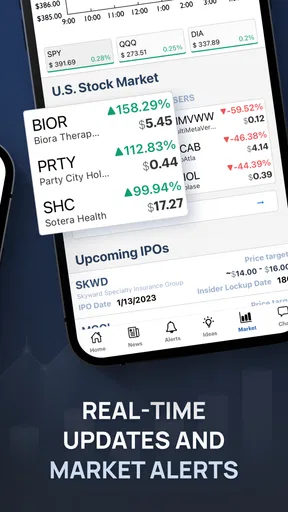
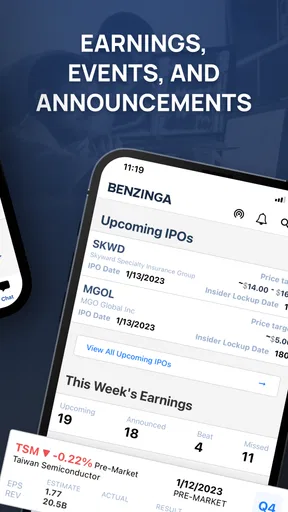
Another feature worth mentioning is the calendar. It’s packed with upcoming earnings reports, IPOs, and other important financial events. Having all these dates in one place means you’ll never miss a beat.
The calendar is most useful to me as a planning aid. If a company I follow is approaching an earnings report, I can decide in advance whether I want to read the news that day or avoid making a rushed decision in the middle of a busy schedule. An event date is not a forecast, though, and it does not tell me how the market will react. I would use it to organize attention, then wait for the actual information before judging its significance.
User Experience
What I love about Benzinga is how user-friendly it is. The developers clearly designed it with the user in mind. The navigation is intuitive, and everything is just a tap away. Even if you're not a tech-savvy person, you’ll find it easy to navigate.
The app is also quite responsive. I haven’t experienced any lag or crashes, which is a massive plus. Nothing's more frustrating than an app that freezes during a crucial trade! Plus, it doesn't hog too much of your phone's resources, which is always a bonus.
My everyday use would be less dramatic than watching every tick: I might check the feed over breakfast, spot a company story connected to something I already follow, and save the question for a calmer research session later. That workflow makes the app convenient without turning it into a reason to trade impulsively. It also gives me a simple test for whether the feed is earning its place on my phone: are the items helping me understand a topic, or just keeping me refreshing?
Choosing it over the usual alternatives
Compared with a broker’s app, Benzinga is better suited to following news and exploring market ideas than handling account-specific work. A brokerage interface is the natural place to review holdings or place orders; a news app is where I would look for context before deciding whether there is anything worth investigating. I would keep those jobs separate rather than expect one tool to do both equally well.
Compared with general news apps, a finance-focused feed can make market stories easier to find, while a broad news service may offer more coverage of politics, local events, or subjects outside investing. And compared with a simple watchlist, a screener can help me discover companies beyond the names I already know. The trade-off is that extra information can create noise, so I would choose Benzinga when I want active market coverage, not when I need a quiet, minimal overview.
It is also worth asking what kind of investor you are before making it part of a routine. Someone who researches individual stocks or follows business news may appreciate the feed, calendar, and screening tools together. Someone whose main need is tracking a household budget, paying bills, or seeing a bank balance should look for a finance app built around those tasks instead. I would skip Benzinga if market headlines tend to make me anxious or encourage frequent, unplanned trading.
Access, cost, and sensible expectations
Benzinga is free to download, while in-app purchases are available from a few dollars to a few hundred dollars per item. I would start with the free experience and decide whether any paid option addresses a real need before spending. The existence of purchases does not mean every reader needs them; if my main goal is occasional headline reading, I would be careful not to pay for more access than I will use.
The app is rated for Everyone 10+, has a 4.4 average from around 3,200 ratings, and has been installed over 100,000 times. Those figures offer a little context about its audience, but they do not tell me whether its particular mix of news and tools suits my habits. I would judge that by trying a focused routine and checking whether I can find relevant information without being drawn into unnecessary activity.
For anyone comparing versions or device requirements, the current version is 3.5.11 and the minimum operating-system requirement is 7.0. The app was released on January 28, 2022. Those details are useful when checking compatibility, but they are not a measure of editorial quality or a promise that every device will feel the same in everyday use.
Why It’s Worth Your Time
So, why should you give Benzinga a shot? Well, if you’re serious about investing or just want to keep an eye on the financial world, it’s a no-brainer. The app offers a massive amount of information and tools that can help you make smarter financial decisions.
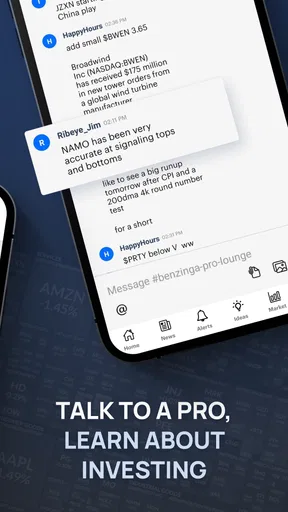
It’s not just for the pros, either. Whether you’re a seasoned trader or just starting out, Benzinga’s got something for everyone. The educational content is especially useful for beginners looking to get their feet wet in the investment world.
I would put one qualification on that recommendation: beginners benefit most when they use the app to learn how to ask better questions, not when they treat the first result or headline as an answer. A new investor could follow one familiar company, compare a few stories over time, and use the calendar to understand when significant updates are expected. That is a manageable way to build context without pretending that reading more headlines automatically makes a portfolio safer.
For a busy reader, the useful question is whether this app saves effort compared with checking several finance sources separately. If I only want an occasional broad market summary, a general news app may be enough. If I regularly investigate companies, want a dedicated screening tool, and care about upcoming financial events, Benzinga’s combination is more compelling. The best fit depends on whether those tools support a real habit rather than simply adding another stream to check.
Final Thoughts
In a world where information is power, having an app like Benzinga Financial News & Data is a game-changer. It combines the latest news, insightful analyses, and fantastic tools all in one place. While no app is perfect, Benzinga comes pretty close by offering everything a modern investor needs.
If you’re ready to take your financial knowledge up a notch, give Benzinga Financial News & Data a try. Trust me, you won’t regret it!
My more cautious recommendation is to try it with a clear purpose: follow a small number of topics, use the calendar to plan when to read, and treat screen results as leads for further research. That gives the app room to be helpful without handing it control over your attention or your financial choices. I would not promise that it will suit everyone, but for a reader who wants market coverage and is comfortable checking important claims before acting, it is a practical option to consider.
Pros
- User-friendly interface for quick navigation.
- Real-time financial market updates.
- Comprehensive stock analysis tools.
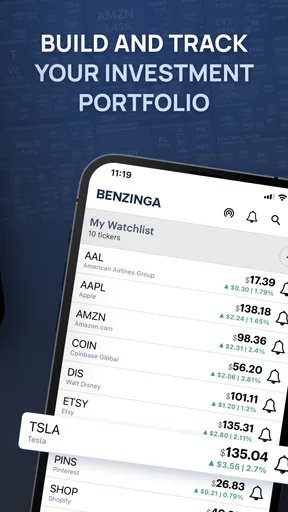
- Customizable watchlists for tracking.
- Detailed company profiles and insights.
Cons
- Requires subscription for premium features.
- Limited offline accessibility.
- Occasional app crashes reported.
- Some ads in the free version.
- Notifications can be overwhelming.
FAQs for Benzinga Financial News & Data
What features does the Benzinga Financial News & Data app offer?
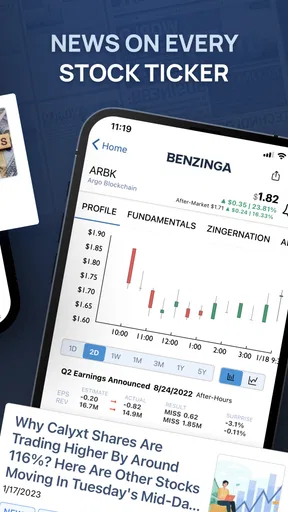
The Benzinga Financial News & Data app provides real-time financial news, stock market analysis, and trading insights. It offers a customizable news feed, market data, and alerts to help users stay informed about market trends. Additionally, the app includes tools for tracking stocks and accessing detailed financial reports.
Is the Benzinga app suitable for beginners in stock trading?
Yes, the Benzinga app is designed to cater to both beginners and experienced traders. It offers educational resources and tutorials to help new users understand market concepts. The intuitive interface and simple navigation make it easy for beginners to get started with stock tracking and financial news analysis.
Does the Benzinga app require a subscription for full access?
The Benzinga app offers both free and premium subscription options. While the free version provides access to essential news and data, the premium subscription unlocks additional features such as advanced stock analysis tools, exclusive market insights, and ad-free browsing. Users can choose the plan that best fits their needs.
How frequently is the news updated on the Benzinga app?
The Benzinga app updates news in real-time, ensuring that users have access to the latest market developments as they happen. With a team of financial journalists and analysts, the app provides timely updates on stock movements, economic events, and financial trends throughout the trading day.
Can I customize notifications on the Benzinga app?
Yes, the Benzinga app allows users to customize notifications based on their preferences. You can set alerts for specific stocks, news categories, or market events to receive timely updates. This feature helps users stay informed about important developments that could impact their investment strategies.


